

How field mapping works between Microsoft Exchange or Google Workspace and Salesforce#
Supported platforms: Exchange Server
 Microsoft 365
 Google
Revenue Grid integrates with Salesforce by syncing and updating matching fields between Microsoft Exchange / Google and Salesforce objects. Below are the typical field matching patterns applied for standard Salesforce objects:
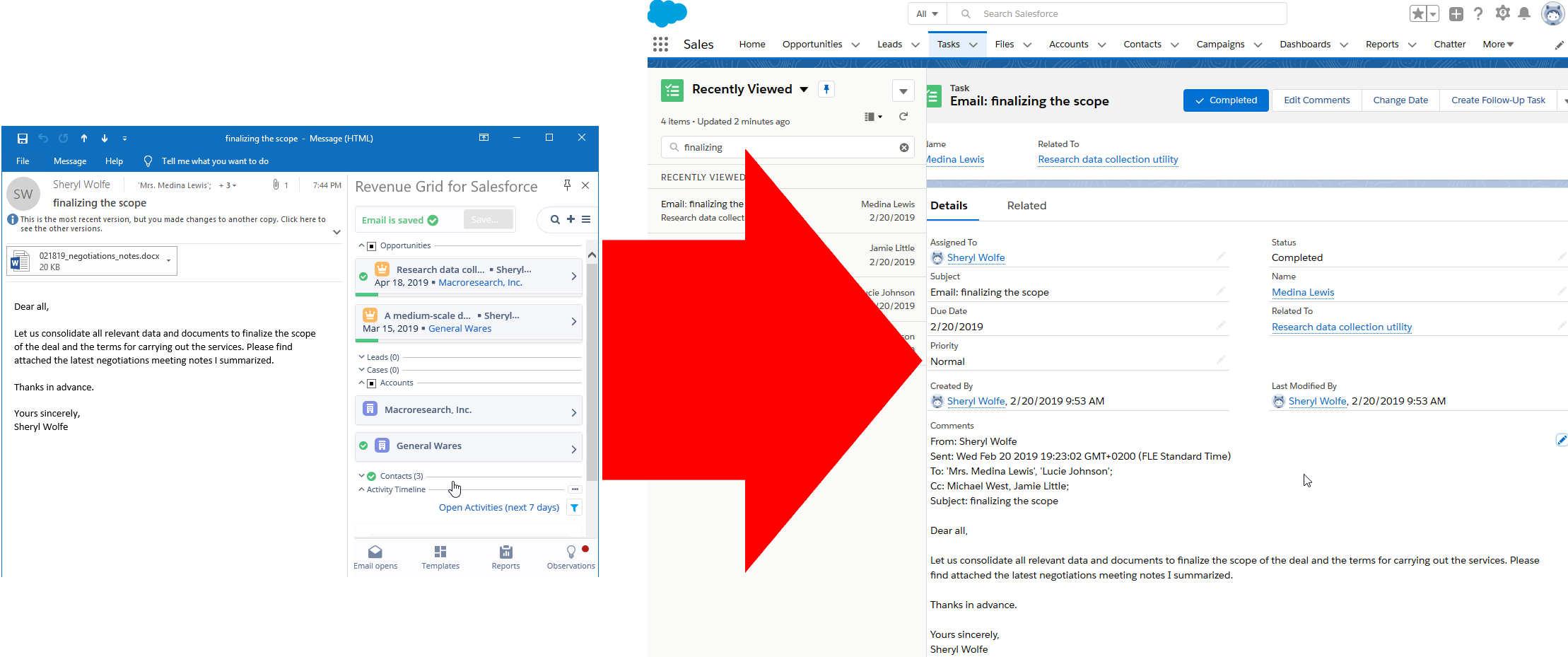
Emails: Matched with Salesforce Task or Email Message objects, depending on your org’s Salesforce configuration.
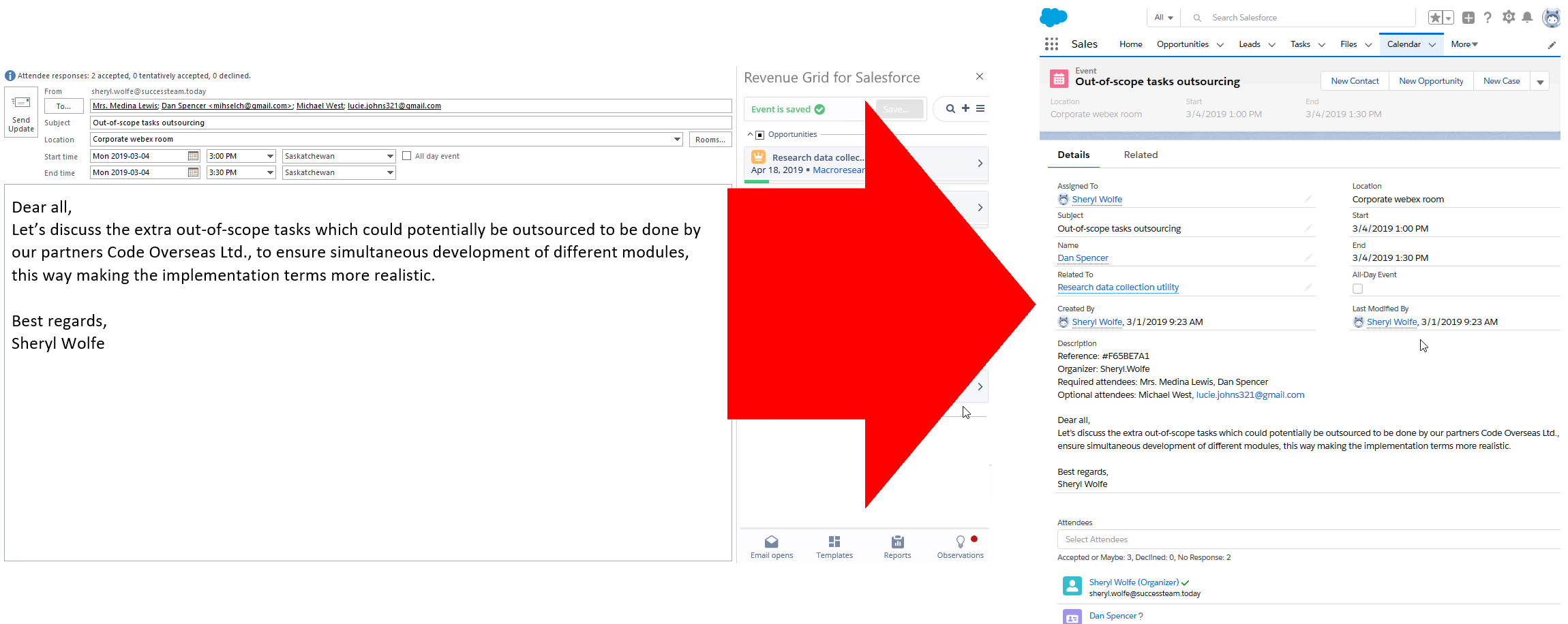
Meetings/Appointments/Events: Matched with Salesforce Event objects.
Tasks: Matched with Salesforce Task objects.
Contacts: Matched with Salesforce Contact or Person Account objects.
Note
In custom configurations, Microsoft Exchange calendar items may also sync with Salesforce Tasks or other objects. In these cases, field mapping patterns will vary.
Microsoft Exchange Server / Microsoft 365 ↔ Salesforce sync#
Email sync#
Outlook field/control label or {hidden field} |
Microsoft Exchange Server/ Microsoft 365 field |
Salesforce field (Tasks - Enhanced Email off) |
Salesforce field (Email Messages – Enhanced Email on) |
|---|---|---|---|
“Subject” line |
Subject |
Subject |
Subject |
“Body” box |
Body |
Comments |
Description |
{Sent time/date} |
DateTimeSent |
Comments |
DateTimeSent |
{Received time/date} |
DateTimeReceived |
Comments |
DateTimeReceived |
“From” line |
From |
Comments |
FromAddress |
“To” line |
ToRecipients |
Comments |
ToAddress |
“CC” line |
CcRecipients |
Comments |
CcAddress |
“BCC” line |
BccRecipients |
Comments |
BccAddress |
{Inbox/Sent folder placement} |
IsReceived |
IsInbound |
IsReceived |
{The “has # attachments” indicator} |
Attachments |
n/a |
HasAttachments (does not reflect the actual state) |
Sensitivity |
IsPrivate |
IsPrivate |
|
{Message-ID GUID} |
InternetMessageId |
InternetMessageId |
GroupwareItemID |
InternetMessageHeaders |
n/a |
Headers |
|
{ID of the correspondence thread the email belongs to, used for this feature} |
ConversationId |
ConversationId |
ConversationId |
n/a |
n/a |
IsCreatedBySync (used to define if the email was saved by Context Sync) |
IsCreatedBySync (used to define if the email was saved by Context Sync) |
For additional technical details, see:
Calendar item sync#
Outlook field/control label or {hidden field} |
Microsoft Exchange Server/ Microsoft 365 field |
Salesforce Event field |
|---|---|---|
{Item’s recurrence flag and related data} |
Recurrence |
IsRecurrence2, ServerSync_RecurrenceData |
n/a |
MimeContent |
MimeContent |
“Subject” line |
Subject |
Subject |
“Body” box |
Body |
Description |
“Location” line |
Location |
Location |
“All day event” checkbox |
IsAllDayEvent |
IsAllDayEvent |
“Start time” field |
Start |
StartDateTime |
Start timezone field |
StartTimeZone |
StartTimeZone |
“End time” field |
End |
EndDateTime |
End timezone field |
EndTimeZone |
EndTimeZone |
“Reminder” time span picklist |
ReminderMinutesBeforeStart |
ReminderMinutesBeforeStart |
{Reminder enabled} |
IsReminderSet |
IsReminderSet |
{The date/time of event start} |
ReminderDueBy |
ReminderDateTime |
“Show as:” picklist (Free, Working Elsewhere, Tentative, Busy, Out of Office) |
LegacyFreeBusyStatus |
ShowAs |
{Contacts/Email addresses added as Required (To field)} |
RequiredAttendees |
ServerSync_NamedRequiredAttendees |
{Contacts/Email addresses added as Optional (CC field)} |
OptionalAttendees |
ServerSync_NamedOptionalAttendees |
{Contacts/Email addresses added as Resources (BCC field)} |
Resources |
ServerSync_NamedResources |
{Calendar item Organizer’s address} |
Organizer |
ServerSync_NamedOrganizer |
AppointmentState |
ServerSync_IsOrganizer |
|
{Indicator if the item is private, personal, or confidential} |
Sensitivity |
IsPrivate |
Refer to these resources for more details:
Task sync#
Outlook field/control label or {hidden field} |
Microsoft Exchange Server/ Microsoft 365 field |
Salesforce field |
|---|---|---|
“Subject” line |
Subject |
Subject |
“Priority” flag |
Importance |
Priority |
“Reminder” checkbox |
IsReminderSet |
IsReminderSet |
Reminder’s Date field |
ReminderDueBy |
ReminderDateTime |
“Description” box |
Body |
Description |
“Description” box (Smart Description) |
Body |
|
“Due date” field |
DueDate |
ActivityDate |
“Status” field |
Status |
Status |
“Private” flag |
Sensitivity |
IsPrivate |
For additional details, see:
Contact sync#
Outlook field/control label or {hidden field} |
Microsoft Exchange Server/ Microsoft 365 field |
Salesforce field |
|---|---|---|
{Full Name: First Name} |
GivenName |
FirstName |
{Full Name: Last Name} |
Surname |
LastName |
{Full Name: Middle Name} |
MiddleName |
MiddleName |
{Full Name: Salutation} |
Salutation |
Salutation |
{Full Name: Generation} |
Generation |
Suffix |
“Job Title” field |
JobTitle |
Title |
“Company” field |
CompanyName |
ServerSync_CompanyName |
“Web Page Address” field |
WebPage |
Link to the Contact’s profile in Salesforce |
“E-mail” field |
EmailAddresses |
|
“Primary Phone” field |
PhoneNumbers |
Phone |
“Mobile Phone” field |
PhoneNumbers |
MobilePhone |
“Business Phone” field |
PhoneNumbers |
BusinessPhoneNumber |
“Business Fax” field |
PhoneNumbers |
Fax |
“Assistant’s Phone” field |
PhoneNumbers |
AssistantPhone |
“Home Phone” field |
PhoneNumbers |
HomePhone |
“Other Phone” field |
PhoneNumbers |
OtherPhone |
{Description box} (Standard Description) |
Body |
Description |
{Description box} (Smart Description) |
Body |
SmartDescription |
“Assistant” field |
AssistantName |
AssistantName |
“Business Street” field |
PhysicalAddresses |
MailingStreet |
“Business City” field |
PhysicalAddresses |
MailingCity |
“Business State” field |
PhysicalAddresses |
MailingState |
“Business Postal Code” field |
PhysicalAddresses |
MailingPostalCode |
“Business Country/Region” field |
PhysicalAddresses |
MailingCountry |
“Other Street” field |
PhysicalAddresses |
OtherStreet |
“Other City” field |
PhysicalAddresses |
OtherCity |
“Other State” field |
PhysicalAddresses |
OtherState |
“Other Postal Code” field |
PhysicalAddresses |
OtherPostalCode |
“Other Country/Region” field |
PhysicalAddresses |
OtherCountry |
“Birthday” field |
Birthday |
Birthdate |
“Department” field |
Department |
Department |
“Private” flag |
Sensitivity |
IsPrivate |
For details, refer to these articles:
Person Account sync#
Outlook field/control label or {hidden field} |
Microsoft Exchange Server/ Microsoft 365 field |
Salesforce field |
|---|---|---|
{Full Name: First Name} |
GivenName |
FirstName |
{Full Name: Last Name} |
Surname |
LastName |
{Full Name: Middle Name} |
MiddleName |
MiddleName |
{Full Name: Salutation} |
Salutation |
Salutation |
“Job Title” field |
JobTitle |
PersonTitle |
“Email Address” field |
EmailAddresses |
PersonEmail |
“Mobile Phone” field |
PhoneNumbers |
PersonMobilePhone |
“Primary Phone” field |
PhoneNumbers |
Phone |
“Business Fax” field |
PhoneNumbers |
Fax |
“Assistant’s Phone” field |
PhoneNumbers |
PersonAssistantPhone |
“Home Phone” field |
PhoneNumbers |
PersonHomePhone |
“Other Phone” field |
PhoneNumbers |
OtherPhone |
{Description (Notes)} |
Body |
Description |
{Smart Description} |
Body |
SmartDescription |
“Assistant Name” field |
AssistantName |
PersonAssistantName |
“Business Address: Street” field |
PhysicalAddresses |
PersonMailingStreet |
“Business Address: City” field |
PhysicalAddresses |
PersonMailingCity |
“Business Address: State” field |
PhysicalAddresses |
PersonMailingState |
“Business Address: Postal Code” field |
PhysicalAddresses |
PersonMailingPostalCode |
“Business Address: Country/Region” field |
PhysicalAddresses |
PersonMailingCountry |
“Other Address: Street” field |
PhysicalAddresses |
PersonOtherStreet |
“Other Address: City” field |
PhysicalAddresses |
PersonOtherCity |
“Other Address: State” field |
PhysicalAddresses |
PersonOtherState |
“Other Address: Postal Code” field |
PhysicalAddresses |
PersonOtherPostalCode |
“Other Address: Country/Region” field |
PhysicalAddresses |
PersonOtherCountry |
“Birthday” field |
Birthday |
PersonBirthdate |
“Department” field |
Department |
PersonDepartment |
“Web Page Address” field (Link to Profile) |
WebPage |
Link to the Person Account’s profile in Salesforce |
“Company Name” field |
CompanyName |
ServerSync_CompanyName |
{Created Date} |
n/a |
CreatedDate |
{Is Person Account} |
n/a |
IsPersonAccount |
Learn more here:
Google ↔ Salesforce sync#
Google Task sync#
Google Task field |
Salesforce Task field |
|---|---|
n/a |
Assigned to |
n/a |
Recurrence interval |
n/a |
Repeat this task |
n/a |
Call type |
Title |
Subject |
n/a |
Call object identifier |
n/a |
Call result |
n/a |
Task subtype |
Due (date only) |
Due date |
n/a |
Phone |
n/a |
Call duration |
n/a |
Priority |
n/a |
Created by |
Notes |
Comments |
Status |
Status |
n/a |
Name (WhoId) |
n/a |
Related to (WhatId) |
n/a |
Email address |
n/a |
Last modified by |
Not supported |
Recurring Tasks |
Not supported |
Custom added fields |
Task statuses mapping#
Google Task status |
Salesforce Task status |
|---|---|
needsAction |
Notes |
needsAction |
InProgress |
completed |
Completed |
needsAction |
WaitingOnOthers |
needsAction |
Deferred |
For more details, see: