

Manage connected applications#
Connected applications are applications that you have authorized to access Revenue Grid through the Model Context Protocol (MCP).
Use the Connected applications page to review applications associated with your Revenue Grid account, check their publisher verification status and recent usage, and revoke access when you no longer want an application to access Revenue Grid on your behalf.
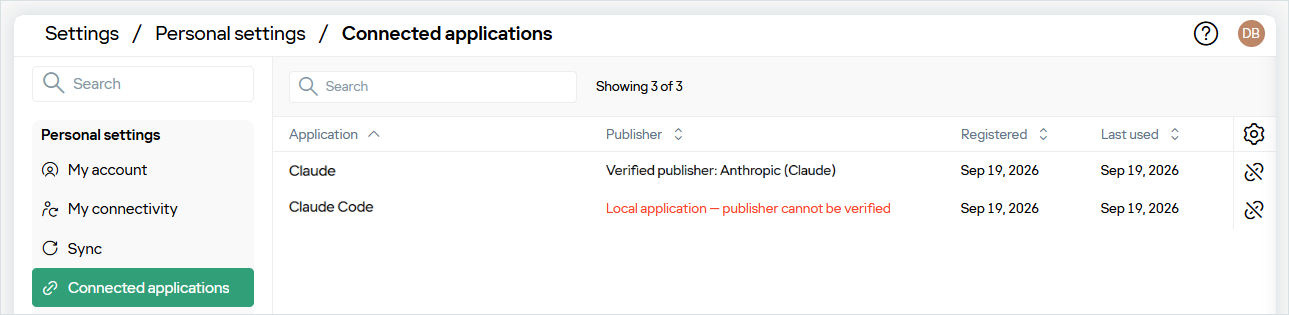
The Connected applications page is for reviewing and managing existing connections. You don’t connect new applications from this page.
View your connected applications#
To view your connected applications:
Sign in to the Revenue Grid platform.
In the top-right corner, select the profile icon, and then select Settings.
Go to Personal settings → Connected applications.
The page displays applications that you have authorized to access Revenue Grid.
For each application, you can see the following information:
Column |
Description |
|---|---|
Application |
The name provided for the application. |
Publisher |
The application’s publisher verification status. |
Registered |
The date when the application was registered with Revenue Grid. |
Last used |
The date when the application last accessed Revenue Grid on your behalf. |
Revenue Grid updates the Last used date periodically, so it may not reflect the most recent access immediately.
Publisher verification statuses#
The Publisher column indicates whether Revenue Grid recognizes the application’s publisher based on its registered destination.
The following statuses are available:
Status |
Description |
|---|---|
Verified publisher: Publisher name |
Revenue Grid recognizes the application’s publisher based on its registered destination. |
Unverified — this name was supplied by the app |
Revenue Grid can’t verify the publisher. The displayed application name was provided by the application during registration. |
Local application — publisher cannot be verified |
The application runs locally and doesn’t provide a remote destination that Revenue Grid can use to verify its publisher. |
An unverified publisher doesn’t prevent an application from connecting to Revenue Grid.
Publisher verification helps you identify the publisher associated with an application. It doesn’t indicate that Revenue Grid has reviewed or certified the application.
Revoke access to Revenue Grid#
If you no longer want an application to access Revenue Grid on your behalf, revoke its authorization.
To revoke access:
Go to Settings → Personal settings → Connected applications.
Find the application you want to disconnect.
In the table actions, select the revoke icon.

In the confirmation dialog, select Revoke.
After you revoke an application, it may retain access to Revenue Grid for a short time. After its current access expires, the application can no longer access Revenue Grid on your behalf unless you authorize it again.
Connect an application to Revenue Grid#
Currently, Revenue Grid provides a documented setup flow for connecting Revenue Grid to Claude through the Revenue Grid plugin. For instructions, see Set up Revenue Grid for Claude plugin.
For more information about the plugin, see Revenue Grid plugin for Claude overview.