

Supported meeting locations in Book Me#
Supported platforms: Exchange Server
 Microsoft 365
 Google
When creating a Book Me link, you define where the meeting will take place. Book Me supports both physical locations and video conferencing tools, depending on your connected email provider and configuration.
Physical meeting locations#
You can specify a physical meeting location by entering an address or room name.

Examples:
Orion Meeting Room – London Office
5th Floor, Room 502 – New York Office
If you use Microsoft Exchange (on-premises), you can select a location from your Exchange room resources.
The specified location appears in the calendar invitation after the meeting is booked.
Video conferencing tools#
You can select a supported video conferencing tool as a meeting location. After the meeting is booked, a unique meeting link is automatically generated and added to the calendar invitation.

The availability of video conferencing options depends on your email provider and how your account is connected to Revenue Grid.
Email provider and connection type |
Supported tools |
|---|---|
Microsoft Exchange or Microsoft 365 (EWS) |
Zoom |
Microsoft 365 (Microsoft Graph) |
Microsoft Teams, Zoom |
Google Workspace |
Google Meet, Zoom |
Additional details:
Microsoft Teams integration is available by default for Microsoft 365 users connected via Microsoft Graph.
Google Meet integration is available by default for Google Workspace users.
Zoom requires additional setup.
See Zoom integration requirements for more information.
Zoom integration requirements#
To use Zoom as a meeting location, ensure that:
Zoom integration is enabled for your Revenue Grid organization.
If your organization uses a dedicated Revenue Grid instance, a Zoom OAuth application is created in your corporate Zoom account and its credentials are provided to Revenue Grid Support.
If your Zoom account requires admin pre-approval, the Revenue Grid app is approved in the Zoom App Marketplace.
Your Zoom account is connected in your connectivity settings.
For instructions, see:
How video conferencing links are added#
When you select a video conferencing tool as the meeting location, a new, unique meeting link is created for each booking. This ensures that every scheduled meeting has its own dedicated online space.
The link is automatically added to the calendar invitation after the meeting is booked. It is not displayed on the Book Me booking or confirmation pages.
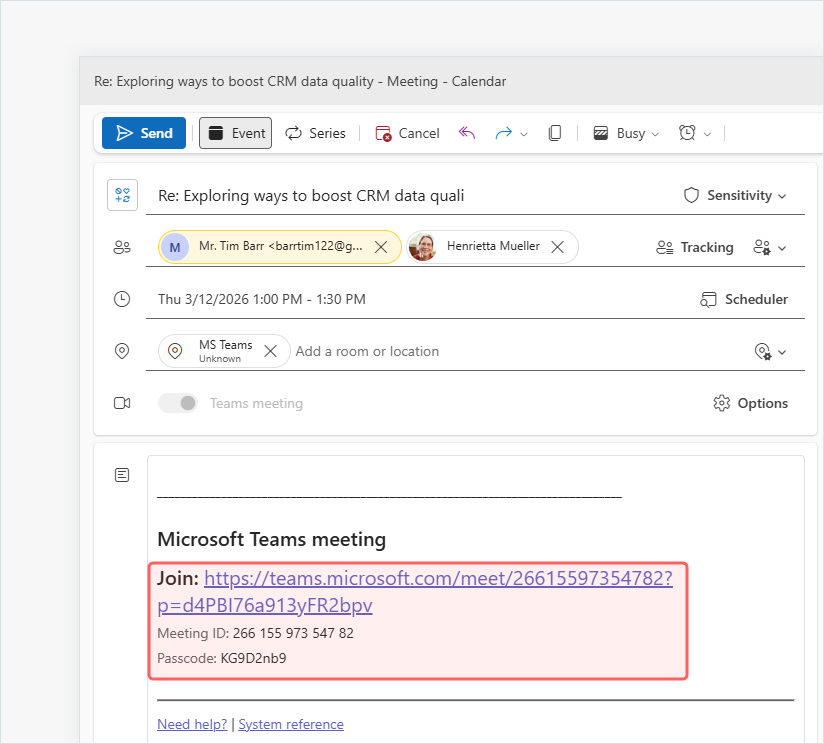
Recipients do not need to belong to your organization to join the meeting. They only need access to the selected video conferencing tool. All participants, both internal and external, join the meeting using the same link generated for that specific booking.