

Confidential email handling#
Confidential email handling ensures that sensitive email communication is protected when synchronized from Microsoft Outlook or Gmail to Salesforce.
When an email involves designated confidential participants, Revenue Grid automatically limits the visibility of its content in Salesforce. This helps protect sensitive business communication while maintaining accurate activity tracking and record linking.
This feature applies to both:
automatic synchronization through Context Sync
manual email saving through Context Panel
How confidential email detection works#
Revenue Grid determines whether an email is confidential based on its participants.
An email is treated as confidential if at least one participant belongs to the configured list of confidential users. This includes:
sender
recipients in the To field
recipients in the CC field
recipients in the BCC field
The confidential users list is configured by Revenue Grid Support upon request.
What happens in confidential mode#
When an email is identified as confidential, Revenue Grid applies a masking rule to protect its content during synchronization to Salesforce:
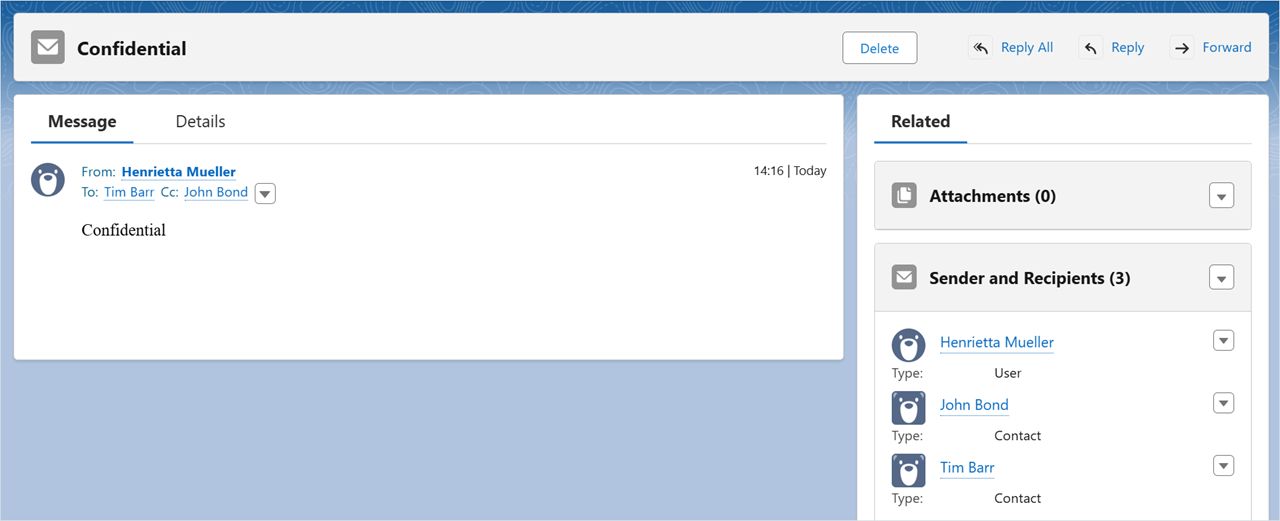
Email subject → replaced with “Confidential”
Email body → replaced with “Confidential”
Attachments → not saved
Email metadata → remains unchanged
The following metadata is still synchronized:
sender and recipient email addresses
date and time
related Salesforce records (People and Business records)
This ensures that the activity is visible in Salesforce without exposing sensitive information.
How confidential emails are synchronized#
During automatic synchronization, confidential emails are processed without user interaction.
The system behavior is as follows:
An email is sent or received
Revenue Grid checks all participants against the confidential users list
If any participant is confidential:
confidential mode is applied
subject and body are masked
The email is synchronized to Salesforce
If no confidential participants are detected, the email is synchronized with full content.
This behavior ensures consistent and secure handling of sensitive communication across all users.
How confidential emails are handled in Context Panel#
When a user opens an email in Context Panel, the system evaluates whether the email includes confidential participants.
Based on this check:
For confidential emails, Context Panel defaults to saving without email content
For regular emails, Context Panel defaults to saving full content
For confidential emails, users can choose how the email is saved:
save without content (default, secure option)
save full email (may include confidential information)
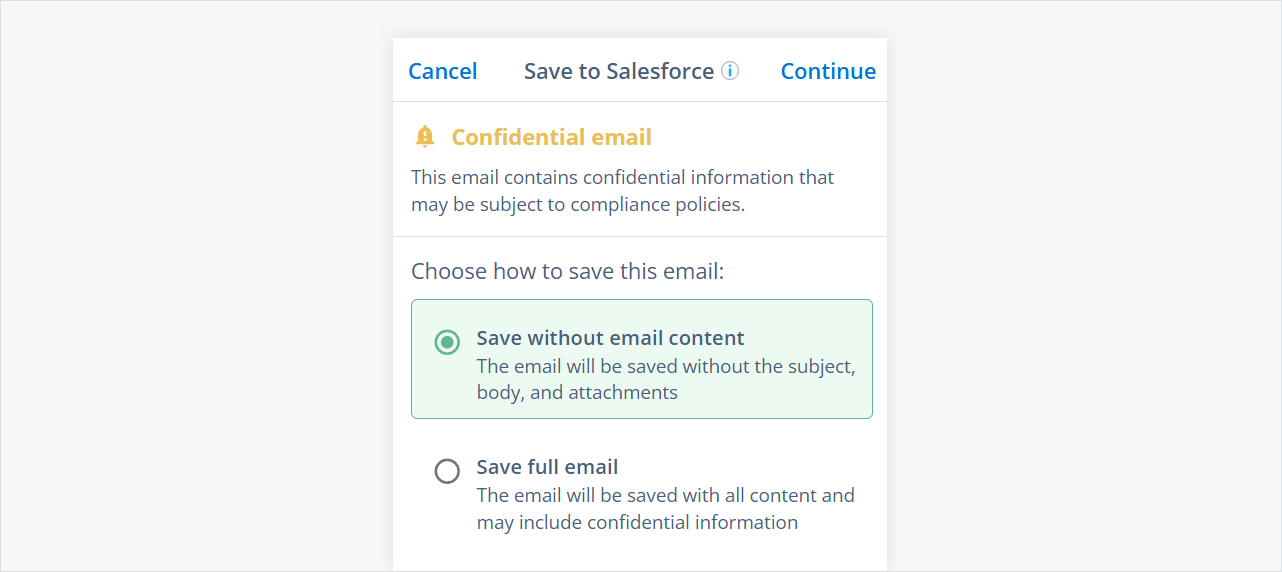
This allows controlled exceptions when full visibility is required.
For step-by-step instructions, see Save confidential emails using Context Panel.
Availability and configuration#
This feature is available upon request.
To enable confidential email handling, provide Revenue Grid Support with a list of email addresses to be treated as confidential. These addresses may include:
internal users (for example, executives)
external contacts
Once configured, the rules are applied automatically across all users in the organization.
Why use confidential email handling#
Confidential email handling helps organizations:
protect sensitive communication in Salesforce
reduce compliance and data exposure risks
ensure consistent system behavior for all users
allow controlled access to full email content when necessary