

Review and revoke Microsoft Entra ID permissions for Revenue Grid#
Supported platforms: Microsoft 365
 administrators can review and revoke Microsoft Graph permissions granted to Revenue Grid through Microsoft Entra ID. For example, you may want to remove permissions for Revenue Grid functionality your organization doesn’t use or permissions that were granted together when you provided admin consent but aren’t required for your configuration.
Before you revoke a permission#
Revoking a permission can make the Revenue Grid functionality that depends on it unavailable. Before making changes, see How Revenue Grid uses Microsoft Graph to connect to Microsoft 365 to identify which functionality uses the permission and whether your organization needs it.
For example, Foresight delegated or application permissions are required only if your organization uses the corresponding AI functionality. If Foresight components aren’t used, their permissions can be revoked without affecting other Revenue Grid functionality.
If you don’t want Revenue Grid to retrieve users’ email aliases from Microsoft Entra ID, you can revoke the User.Read.All application permission. Revenue Grid continues to synchronize mailbox activities by using users’ configured mailbox addresses. However, features that rely on email aliases are unavailable. For more information, see Handling email aliases by Context Sync.
Exchange application permissions authorized through Exchange Online RBAC for Applications are managed separately and aren’t covered by this article.
Review and revoke permissions#
To revoke permissions:
In the Microsoft Entra admin center, go to Enterprise applications > All applications.
Open the enterprise application used by your connection:
For Microsoft Graph app-only connectivity, open Revenue Inbox.
For EWS app-only connectivity, open Revenue Inbox EwsAppOnly.
Select Permissions, then open the Admin consent tab.
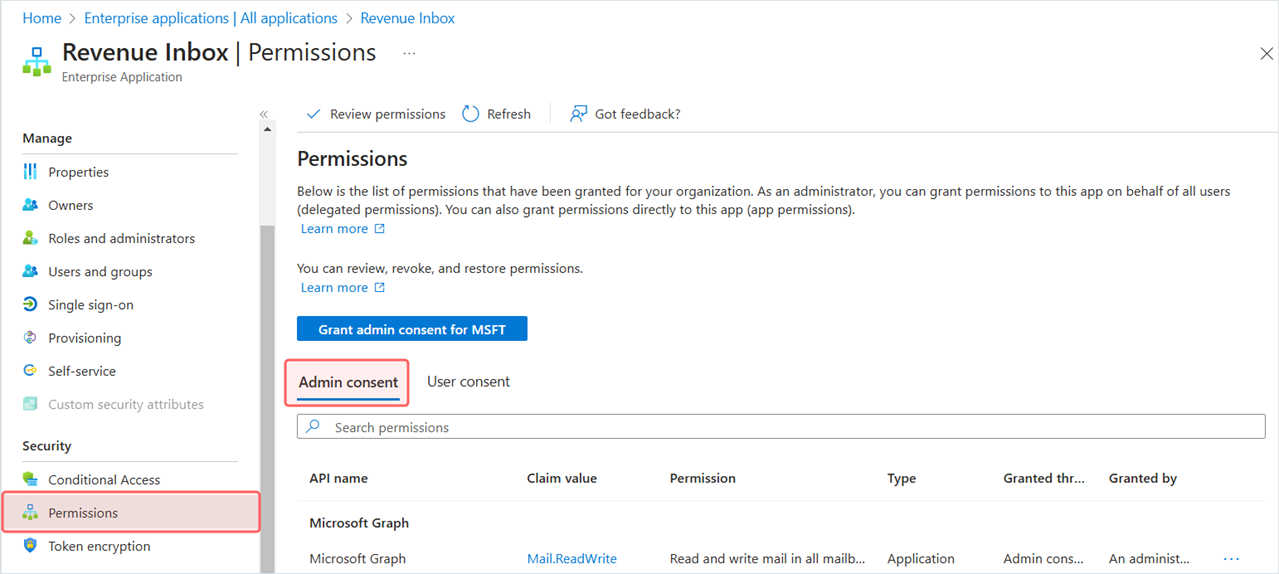
Review the permissions granted to Revenue Grid.
For each mailbox permission you need to revoke, select the ellipsis (…), and then select Revoke permission.
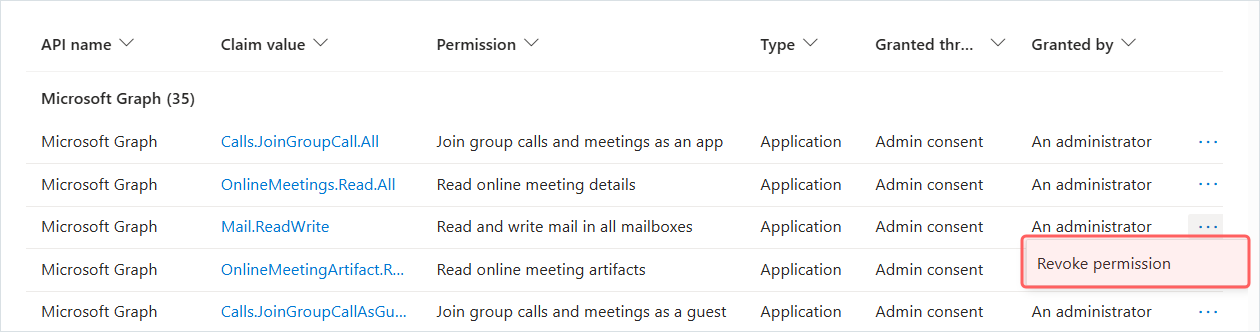
After you revoke a permission, Revenue Grid can no longer use the Microsoft 365 access granted by that permission, and the functionality that depends on it may become unavailable.