

Mass removal of the Revenue Grid for Salesforce and Gmail Chrome extension#
Supported platforms: Google
If the Revenue Grid for Salesforce and Gmail Chrome extension was previously mass-deployed in your organization, you can centrally remove it using your organization’s deployment system.
The procedure below describes the removal via Microsoft Group Policy (Windows + Active Directory).
Remove the extension via Group Policy (Windows + Active Directory)#
Open the Group Policy Management Console (
gpmc.msc) on your domain controller.Navigate to the Group Policy Object (GPO) used for the Context Panel deployment.
Go to User Configuration → Administrative Templates → Google → Google Chrome → Extensions.
Double-click Configure the list of force-installed apps and extensions.
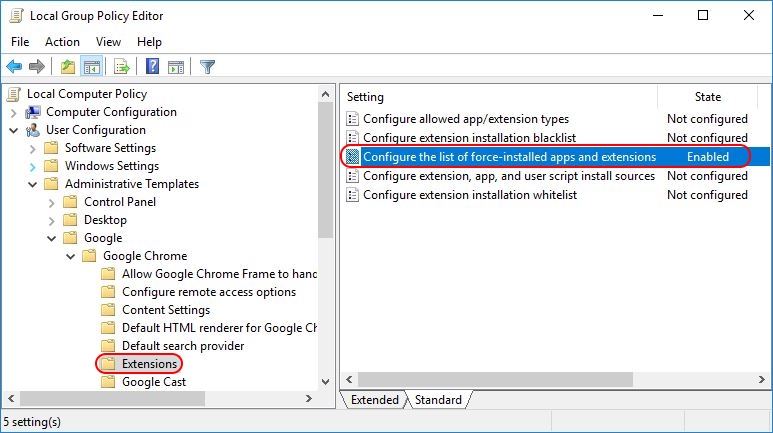
Click Show to open the list of installed extensions.
Find and remove the entry for the Context Panel:
agfekjndkedoakoeahndfnjilkifbicn;https://clients2.google.com/service/update2/crx
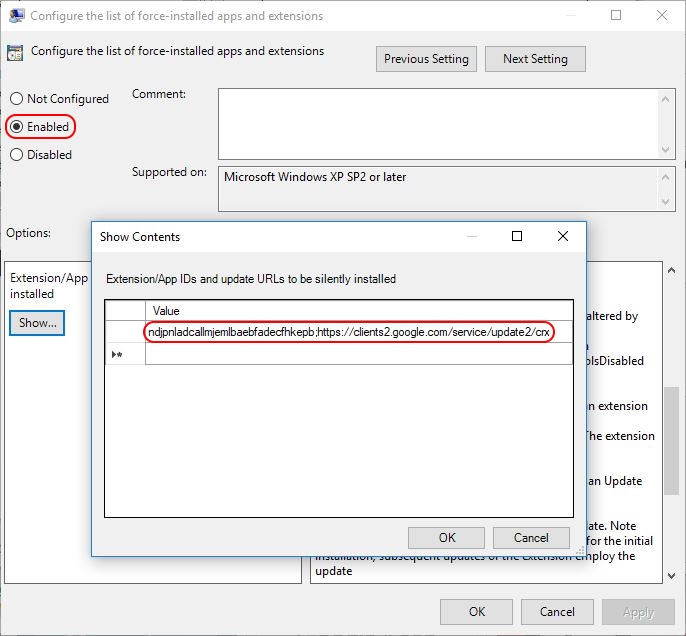
Click OK, then Apply and close the policy setting.
Wait for the next automatic refresh cycle (typically every 90 minutes for domain-joined systems). After the GPO is refreshed, the extension will be automatically removed from all targeted users’ Chrome browsers.