

Quick Send Availability#
Supported platforms: Exchange Server
 Microsoft 365
Quick Send Availability allows you to quickly share your calendar availability without configuring a Book Me link manually. Instead of opening the Context Panel and specifying meeting settings, you can insert a scheduling link directly from the Outlook ribbon. The link is generated automatically using your Book Me default settings.
Requirements#
Quick Send Availability is available for users who use:
Microsoft Exchange
Microsoft 365
Send your availability#
Select an existing email to reply to (read mode), or create a new email (compose mode).
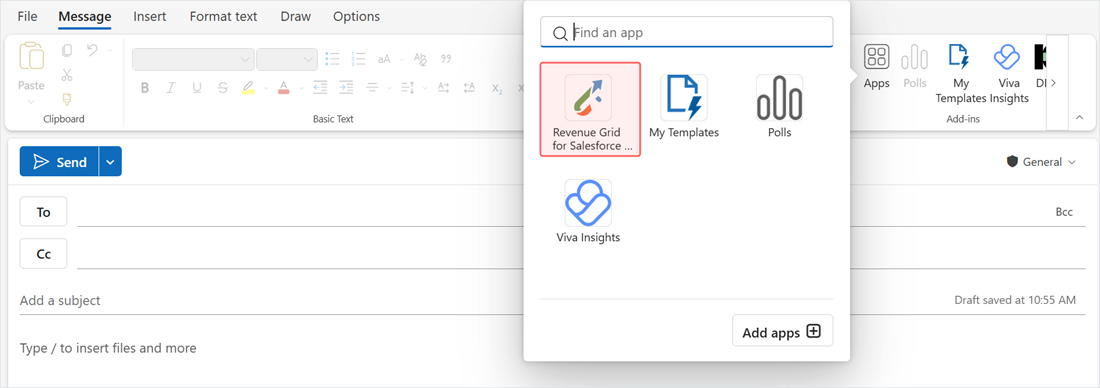
On the Outlook ribbon, in the Add-ins section, select the Revenue Grid for Salesforce CRM app.
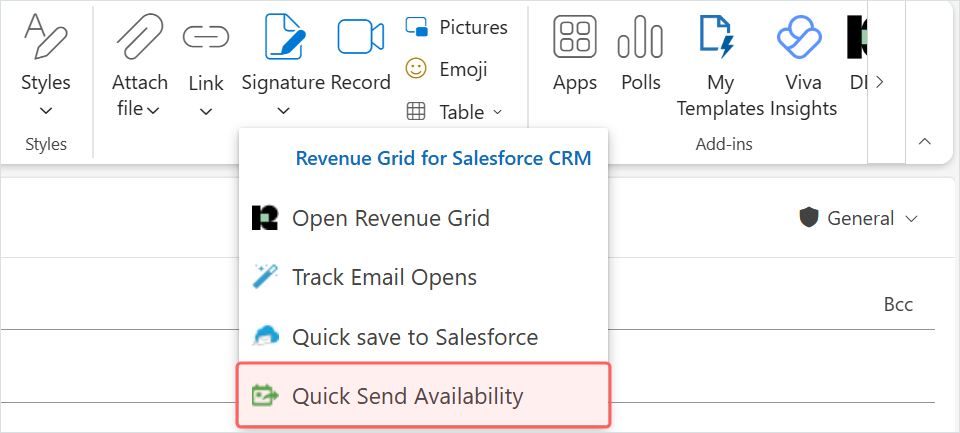
Select Quick Send Availability.
The Book Me link is automatically inserted into the email message. You can then finish composing the email and send it.
Using Quick Send Availability on mobile devices
If you use Quick Send Availability from Outlook on a mobile device while an email is open (read mode), the reply email with the Book Me link is sent automatically after you select Quick Send Availability. The email text cannot be edited. A preconfigured Salesforce email template is used instead.
How the scheduling link is generated#
When you use Quick Send Availability:
Revenue Grid automatically creates a Book Me link using your Book Me defaults.
If Book Me defaults are not configured, the link is generated using the system default values.
The link also uses your calendar availability to generate the available meeting time slots.
For system default values, see Create a personal Book Me link.
To configure Book Me defaults, see Manage Book Me defaults.
Automatic saving to Salesforce#
Quick Send Availability does not support selecting Salesforce records to associate with the meeting. As a result, meetings scheduled through these links cannot be saved to Salesforce automatically.
To learn more about saving Book Me events to Salesforce, see Automatic linking of booked events to Salesforce.
Recipient experience#
When recipients open the link, they see the same booking page used for Book Me links. They can:
view available dates and time slots
select a meeting time
confirm the booking
After confirmation, the meeting is automatically created in the participants’ calendars.
For details about the booking process, see How invitees book a meeting.