

How Context Sync synchronizes meetings when you are an attendee#
Supported platforms: Exchange Server
 Microsoft 365
 Google
You can synchronize meetings that you attend to Salesforce even when you aren’t the meeting organizer. Depending on the meeting organizer and your organization’s configuration, Context Sync uses different synchronization models. This article explains how attendee synchronization works and how to configure the synchronization behavior that best fits your organization.
How attendee event synchronization works#
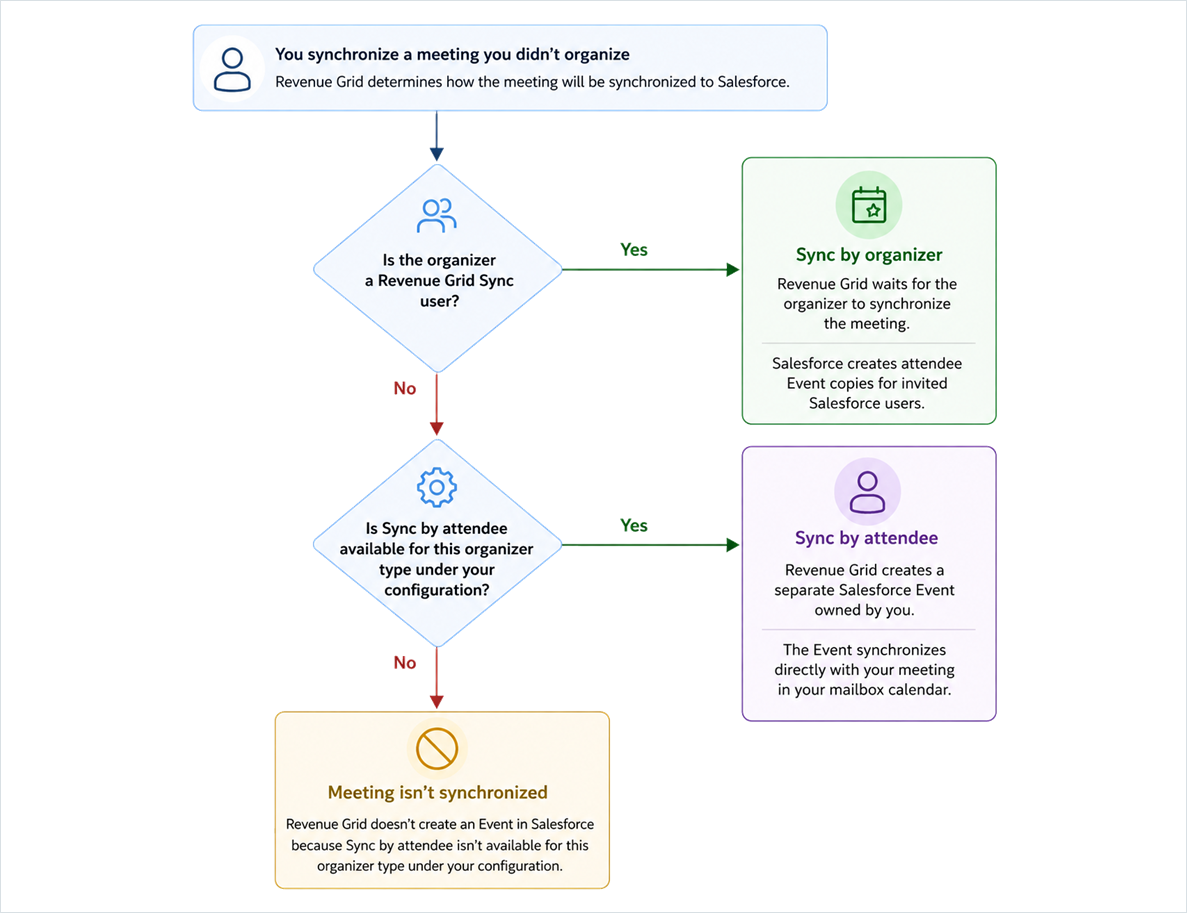
When you synchronize a meeting that was organized by someone else, Context Sync first determines whether the meeting organizer is expected to synchronize the meeting through Context Sync.
An organizer is expected to synchronize the meeting when they are a Salesforce user in your organization who uses Context Sync.
Based on this check, Context Sync uses one of the following synchronization models:
If the organizer is expected to synchronize the meeting, Context Sync uses Sync by organizer.
If the organizer isn’t expected to synchronize the meeting, Context Sync uses Sync by attendee, when it is available for that organizer type under your organization’s configuration.
Otherwise, the meeting isn’t synchronized.
Sync by organizer#
When the meeting organizer is expected to synchronize the meeting through Context Sync, Context Sync waits until the organizer synchronizes it.
After the organizer’s meeting is synchronized to Salesforce, Salesforce automatically creates attendee Event copies for the invited Salesforce users.
These attendee Events:
are synchronized only through the organizer’s Event.
are linked to the same Contacts, Leads, and other related Salesforce records as the organizer’s Event.
are associated with the organizer’s Event, where invited Salesforce users are included as attendees.
This is the default synchronization model for meetings organized by Context Sync users.
Sync by attendee#
When the organizer isn’t expected to synchronize the meeting, Context Sync can instead create a standalone Salesforce Event owned by the attendee. Context Sync synchronizes this Event directly with the attendee’s meeting in their mailbox calendar instead of waiting for the organizer to synchronize the meeting.
The attendee Event:
continues to synchronize with the attendee’s meeting in their mailbox calendar.
can be linked to relevant Contacts, Leads, and other Salesforce records.
doesn’t include other Salesforce users who participate in the meeting as attendees.
This model helps keep your Salesforce calendar complete even when the meeting organizer doesn’t synchronize meetings through Context Sync.
Sync by attendee supports the same event types as Sync by organizer: single timed events, recurring timed events, single all-day events, and single-day recurring all-day events. Multi-day recurring all-day events aren’t currently synchronized by either synchronization model.
Organizer types#
The organizer can belong to one of the following categories:
External organizer – does not belong to your company (uses a different email domain).
Internal organizer without a Salesforce account – belongs to your company but isn’t a user in your Salesforce organization.
Internal organizer with a Salesforce account but without Context Sync – is a Salesforce user but does not synchronize meetings through Context Sync.
Internal organizer with Context Sync – is a user in your Salesforce organization who synchronizes meetings through Context Sync.
Sync by attendee configurations#
By default, Sync by attendee is used only for meetings organized by an external organizer. Context Sync can also be configured to use Sync by attendee for additional organizer types.
The following table shows the available configurations. Each configuration expands the range of meetings that can be synchronized using Sync by attendee.
Meeting organizer |
Default |
Extended |
Full |
|---|---|---|---|
External organizer |
Sync by attendee |
Sync by attendee |
Sync by attendee |
Internal organizer without a Salesforce account |
Not synchronized |
Sync by attendee |
Sync by attendee |
Internal organizer with a Salesforce account but without Context Sync |
Not synchronized |
Not synchronized |
Sync by attendee |
Internal organizer with Context Sync |
Sync by organizer |
Sync by organizer |
Sync by organizer |
The available configurations are:
Default – uses Sync by attendee only for meetings organized by external organizers.
Extended – also uses Sync by attendee for meetings organized by internal organizers who don’t have a Salesforce account.
Full – also uses Sync by attendee for meetings organized by internal organizers who have a Salesforce account but don’t use Context Sync.
Meetings organized by Context Sync users always use Sync by organizer.
Configure Sync by attendee#
The Default configuration is available without additional setup.
To use the Extended or Full configuration, the following prerequisites must be met:
Advanced calendar synchronization is enabled in your Salesforce organization.
You have permission to create Salesforce Events.
For configurations where CRM access is admin-authorized through a Salesforce service account, the service account must have access to the relevant Salesforce activities and User records. Context Sync uses these records to determine whether the meeting organizer is expected to synchronize the meeting.
To request the Extended or Full configuration, contact Revenue Grid Support.
Considerations for Sync by attendee#
If a meeting is synchronized using Sync by attendee, be aware of the following:
Additional Event records are created in Salesforce. Context Sync creates a separate Salesforce Event owned by each attendee who synchronizes the meeting. As a result, the same meeting may be represented by multiple attendee-owned Events in Salesforce.
Salesforce users aren’t added as attendees to attendee-owned Events. This prevents Salesforce from creating child Event copies for other Salesforce users from an attendee-owned Event. Recognized Contacts and Leads can still be related to the Event.
Attendee-owned Events aren’t grouped under an organizer’s Event. Each attendee’s Event is an independent Salesforce record, so reports that group or deduplicate meetings through an organizer’s Event treat these Events as separate meetings.
Meetings that were previously waiting for the organizer are processed automatically. When you expand the Sync by attendee configuration, Context Sync processes existing meetings that become supported by the new configuration during the normal synchronization retry cycle. You don’t need to share them again or reset synchronization.
If the organizer starts using Context Sync later#
If the meeting organizer later starts using Context Sync, Salesforce may create an additional Event for the same meeting because the organizer now synchronizes it through the standard Sync by organizer process.
Context Sync continues synchronizing the attendee’s original standalone Event and ignores the additional Salesforce-generated attendee Event for that attendee. You don’t need to take any action.
Need more complete meeting information in Salesforce?#
When multiple attendees synchronize the same meeting, their Salesforce Events don’t identify the actual organizer or include the complete participant list. This can make it difficult to display meeting participants or report on meetings accurately.
If you need this information, contact Revenue Grid Support. We can help make the following details available in Salesforce for synchronized meetings:
The actual meeting organizer and invited participants, including those without matching Salesforce records.
Participants’ responses to meeting invitations.
Information that helps identify multiple Salesforce Events representing the same meeting.
This capability requires Advanced Calendaring enabled and supports only standard Salesforce Events. Private meetings, meetings without invitees, and recurring meeting series aren’t included.