

Set up bounce protection for Smart Sequences#
Bounce protection helps prevent damage to your sender reputation by monitoring the bounce rate of individual sequences.
The system automatically identifies sequences with unusually high bounce rates and displays warnings or pauses sequences to prevent additional bounced emails.
Administrators can configure the limits that determine when warnings appear and when sequences become eligible for automatic pause.
For more details of how bounce protection works, see Bounce protection in sequences.
Configure bounce protection#
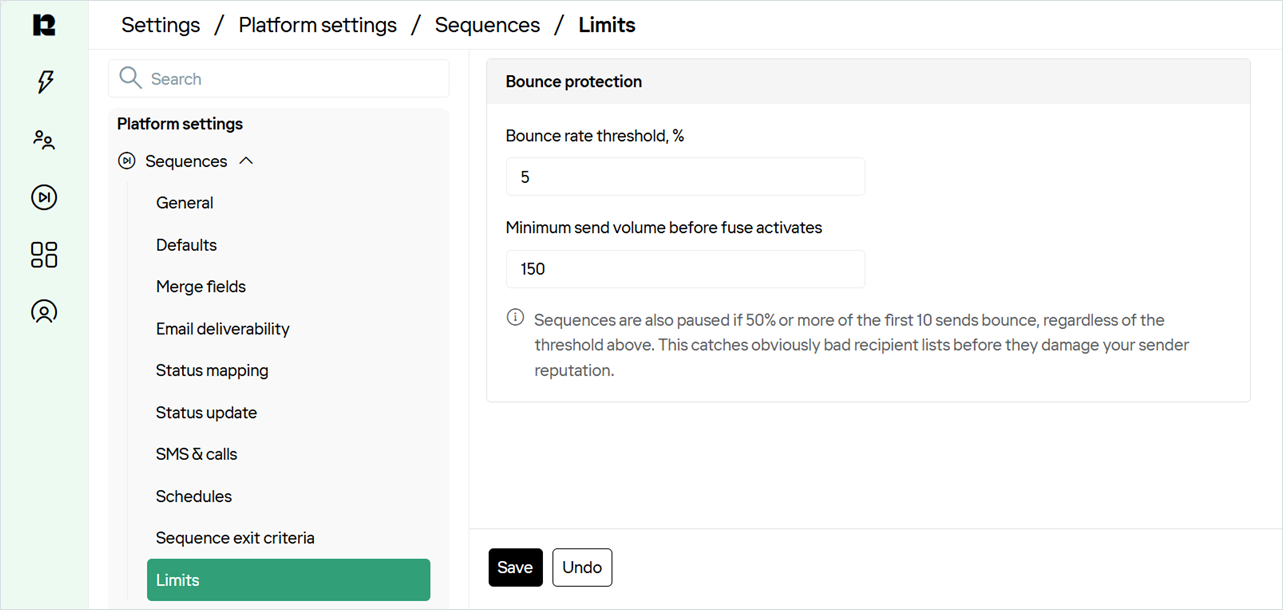
Go to Limits.
Under Bounce protection, configure the following settings:
Bounce rate threshold, % – The bounce rate at which Smart Sequences displays warnings and can pause a sequence once the minimum send volume is reached.
Minimum send volume before fuse activates – The minimum number of sent emails required before the bounce rate threshold can trigger an automatic pause.
Select Save.
In the confirmation dialog, select Apply.
How the settings affect sequences#
When a sequence’s bounce rate reaches or exceeds Bounce rate threshold, %, Smart Sequences displays a warning in the sequence list and in the header on the sequence page.

A warning doesn’t always mean that the sequence will be paused immediately.
Automatic pause conditions#
A sequence pauses automatically when both of the following conditions are met:
Its bounce rate reaches or exceeds the configured bounce rate threshold
The sequence reaches the configured minimum send volume
Early protection rule#
A sequence is also paused when 50% or more of its first 10 sends bounce.
This rule helps stop sequences with invalid recipient lists before they can significantly affect sender reputation.
The early protection rule is built in and can’t be changed.
After applying settings#
Changes apply across the organization.
New limits apply to all existing and future sequences in your organization.
Warnings are recalculated immediately.
Sequences that reach or exceed the new threshold immediately display bounce protection warnings.
Changing the settings doesn’t pause sequences immediately.
If a sequence already meets the configured bounce rate threshold and minimum send volume after your changes, it will be paused when the next bounce occurs.