

Revenue Grid Knowledge Base - Home Revenue Grid Knowledge Base - Home
  • Platform
  • Context Panel and Context Sync
  • Smart Sequences
  • Foresight
    • Kora AI
    • Salesforce Scheduler Adapter
    • Developers
  • Website
  • Facebook
  • X
  • LinkedIn
  • Platform
  • Context Panel and Context Sync
  • Smart Sequences
  • Foresight
  • Kora AI
  • Salesforce Scheduler Adapter
  • Developers
  • Website
  • Facebook
  • X
  • LinkedIn

Section Navigation

  • Product name changes
  • Compatibility
    • Salesforce editions
    • Email platforms
    • Microsoft 365 clients
    • Microsoft Exchange Server clients
    • Google Workspace clients
    • Internet Explorer end of support
  • Licenses and pricing
  • Roles and permissions
  • Support
    • Contact us
    • Grant access to your account
  • What's new
    • Updates by release
      • 2610 (October 2026)
        • Product name changes
        • Confidential event handling
        • Follow-up task creation when saving emails
        • Meeting participant information for sync by attendee
        • Smart Sequences attribute mapping
        • Revenue Grid plugin in Claude's directory
        • Short meeting summaries and new-tab support
        • Next steps widget in Salesforce
        • Meeting summary and action item improvements
      • 2609 (September 2026)
        • Email sync inclusion policies
        • S/MIME-signed email sync
        • Event field locking
        • Personal unsubscribe warning preference
        • Managing unsubscribe link warnings
        • Connected applications page
        • MCP application management
        • Smarter filters for AI Assistants
        • Deal progress reasoning
        • Redesigned Meetings page
        • Meeting side drawer
        • New AI Mentor skills
        • AI Mentor in Salesforce
      • 2608 (August 2026)
        • Expanded Sync by attendee
        • Preserving Google Calendar custom field values
        • Email direction by sender domain
        • Preventing duplicate email content from security tools
        • Grouping emails by conversation in LWC
        • AI-powered linking
        • Custom calendar event data for SSA
        • Calendar status configuration in SSA
        • AI Assistants respect manual linking
        • New Home page
      • 2607 (July 2026)
        • All-day recurring events sync
        • Sequences opt-out rates
        • Sequences unsubscribe warnings
        • Email domain validation
        • Revenue Grid plugin for Claude
        • Action items page
        • Rich text formatting for notes and action items
        • Last and next touch on Opportunities page
        • Redesigned AI stage and close date predictions
        • Dismissing action priority notifications
        • Meeting history from object drawer
        • Evaluation criteria for meeting types
      • 2606 (June 2026)
        • Bounce protection
        • Meeting email recipients
        • Summary citations
      • 2605 (May 2026)
        • AI reply processing
        • Pipeline forecast types
        • Meeting Summary recipients
        • Teams Notetaker name
        • AI Mentor memory
        • AI Mentor modes
        • AI Mentor web search
      • 2604 (April 2026)
        • Confidential email handling
        • Zoom meeting reschedule and cancel
        • Sequence goals
        • Proactive AI notifications
        • Faster and smarter AI Mentor
        • Salesforce orgs management
      • 2603 (March 2026)
        • LWC auto-start
        • Email tracking control
        • Email tracking control for admins
        • New Meeting Evaluation
        • Meeting Notes on mobile
        • Generate Prep anytime
        • Extended email recipients
      • 2602 (February 2026)
        • Book Me rescheduling and cancellation
        • Revenue in Engaged Accounts
        • Engagement by account details
        • Sequence stop on contact deletion
        • Calendar connection via ICS
        • Notes on CRM objects
        • Pipeline by forecast category or stage
        • Meeting recordings
        • Meeting notes for AI summaries
        • Teams Notetaker update
        • Ask in Chat in Meeting Prep
      • 2601 (January 2026)
        • Improved user blocklist
        • Blocklisting for admins
        • Branded booking links
        • Sensitive email filtering
        • Google Spaces Tasks
        • Smarter reply handling
        • Faster Sequences
        • 360° Overviews
        • Sales stats in Pipeline
        • Meeting types report
        • Edit goals in Meeting Prep
        • AI Assistants search update
    • Updates by product
    • Archive
      • Updates by release
        • 2512 (December 2025)
          • Zoom meetings scheduling
          • Automated recipient removal
          • Sequence email AI generation
          • Teams Notetaker
          • Call Intelligence
        • 2511 (November 2025)
          • Auto-cropping settings
          • Coaching visibility settings
          • Platform-level font for sequences
          • Custom meeting attributes
          • Export pipeline to CSV
          • Advanced Currency Management
          • Inline edits in Pipeline
          • Fiscal period selector improved
          • Meeting types, tags, and keywords
          • New Meeting Prep
        • 2510 (October 2025)
          • Filter by lookup fields
          • Filter recipients by date added
          • Accounts and contacts data lake
          • Improved AI linking
          • Account data in AI predictions
          • Share pipeline filters
          • Update opportunities via chat
          • View only available sync options
        • 2509 (September 2025)
          • Stale thread reminder in Gmail
          • Filter recipients by engagement
          • Updated sequence editor
          • Expanded sync settings
          • Disable Google event color coding
          • Re-initialize multiple mailboxes
        • 2508 (August 2025)
          • AI generated email replies
          • AI generated email summary
          • Round-robin scheduling
          • Search opportunities by text
          • Sequences Required Actions report
          • Add recipients from more reports
          • Sort recipients by engagement
        • 2507 (July 2025)
          • AI Mentor chat in the Sidebar
          • Delegated scheduling for Microsoft Graph
          • Settings presets
        • 2506 (June 2025)
          • Activity mix percentages on touchpoints reports
          • Forecasting type filter
          • Updated managed package
          • User's sync settings in the Admin Panel
        • 2505 (May 2025)
          • Change task owner when saving emails
          • New time filters in Forecast
          • Leaks Funnel report removed
          • Sequence recipients removal
          • Generate integration credentials
        • 2504 (April 2025)
          • Sidebar settings for all
          • Leaks Funnel to be removed
          • Team Opportunity Touchpoints report
          • Clickable numbers in Call steps
          • Today's tasks in Past & due items
        • 2503 (March 2025)
          • Customization becomes Sidebar settings
          • Inline edit for Next Step
          • Improved Activity Report widget
          • Team Account Touchpoints report
          • Granting login access
          • Profile in My account
        • 2502 (February 2025)
          • Person Account Name is read-only
          • Pipeline filter by team member
          • Engaged accounts tab
          • Internal activities removed from Team Activity
          • Widgets load 1.5× faster
          • Mass user provisioning
          • Default Opportunity table layout
          • Export sequence performance data
        • 2501 (January 2025)
          • Full Name field is read-only
          • Improved user management
      • Updates by product
      • Updates up to 2024
  • Revenue Grid platform
  • What’s new
  • Updates by release
  • What’s new in 2609 (September 2026)
  • Control the missing unsubscribe link warning for sequence emails

Control the missing unsubscribe link warning for sequence emails#

Released: October 3, 2026

Sequences User settings

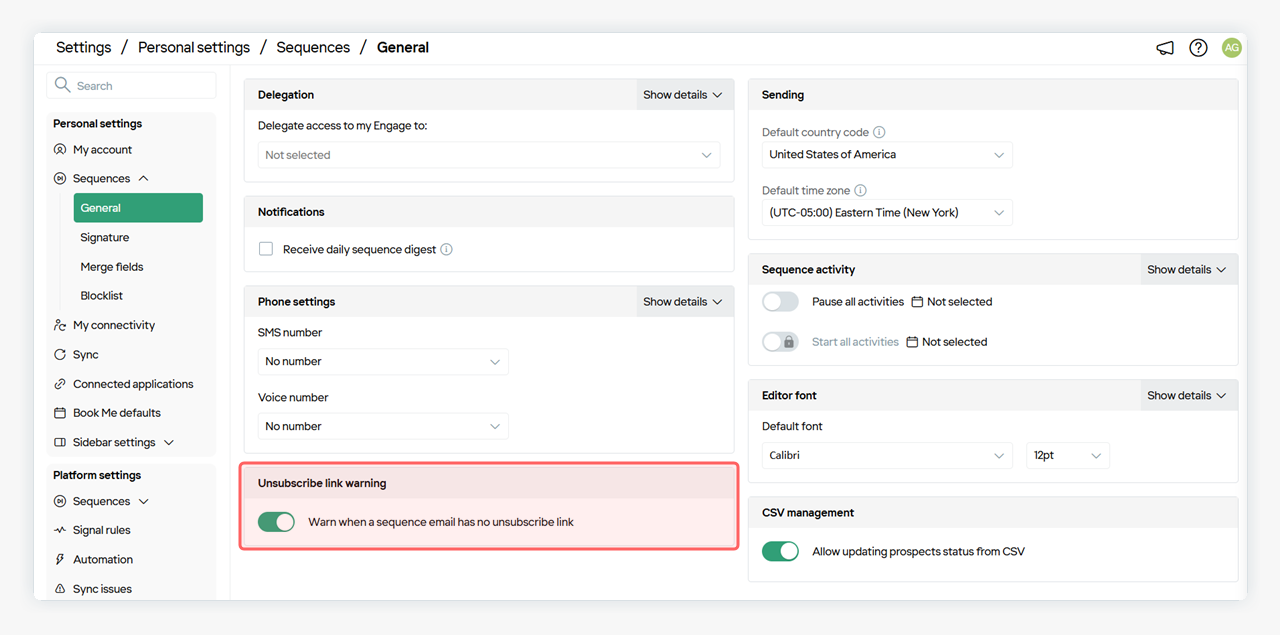
You can now choose whether Revenue Grid warns you when a sequence email doesn’t include an unsubscribe link, if your organization’s settings allow you to manage this preference.
../../../../../../_images/unsubscribe-warning-user1.png

To manage the warning, go to Settings → Personal settings → Sequences → General, and turn Warn when a sequence email has no unsubscribe link on or off.

If you can’t change the setting, your Platform admin controls the warning for your organization.

Learn more about setting up unsubscribe options

previous

Prevent updates to selected event fields during synchronization

next

Control the missing unsubscribe link warning for your organization

© Copyright 2026, Revenue Grid.