

Reduce sequence interruptions from unrelated replies#
Not every reply needs to stop your Sequence. You can now choose to ignore replies that aren’t part of the original email thread, and let a sequence finish without assigning an outcome — ideal for newsletters, event invites, or re-engagement campaigns.
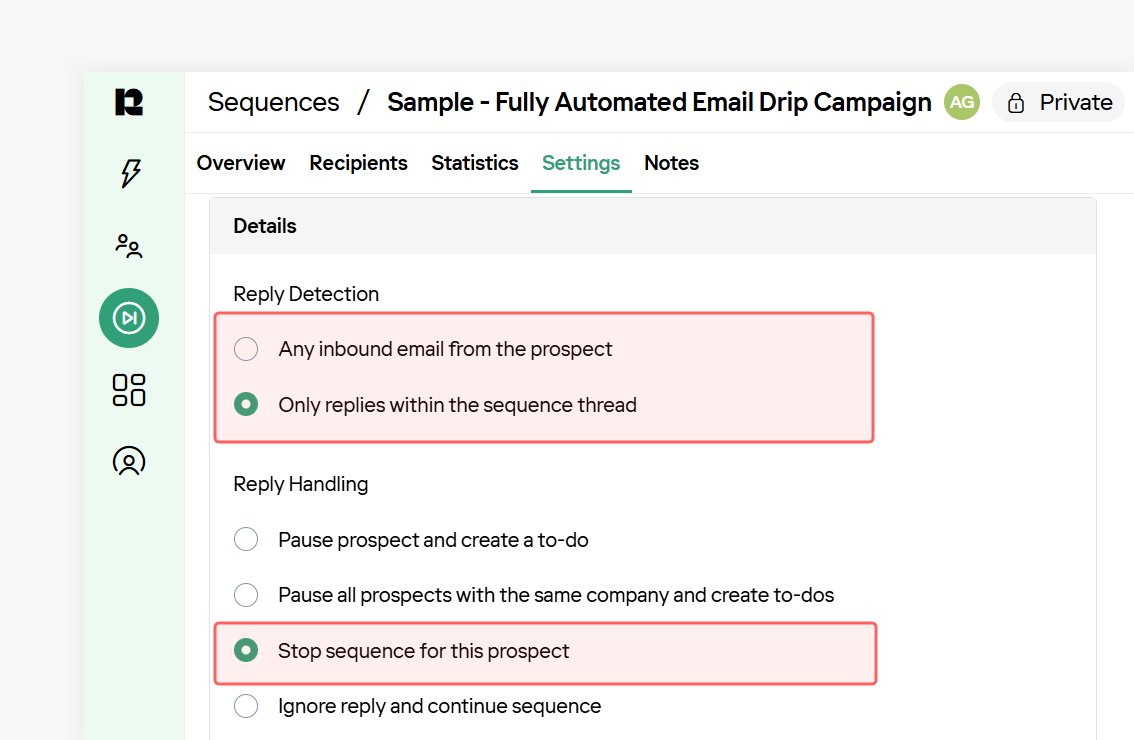
You can now:
Ignore unrelated replies
Your sequence will only stop if the contact replies directly within the same email thread. Replies to other emails won’t interrupt the flow.
Finish a sequence without choosing an outcome
If a contact replies, you can simply let the sequence end for that person — no outcome selection, no Action Center tasks, no friction.
To enable these options, open a sequence, go to the Settings tab, and scroll to the Details section:
In Reply Detection, select Only replies within the sequence thread to make sure unrelated replies don’t interrupt the sequence.
In Reply Handling, choose Stop sequence for this prospect to let the sequence end automatically—no outcome or Action Center task required.
These settings help you keep prospecting and customer communication separate, reduce noise, and let sequences run more smoothly.