

Get started with the Home page#
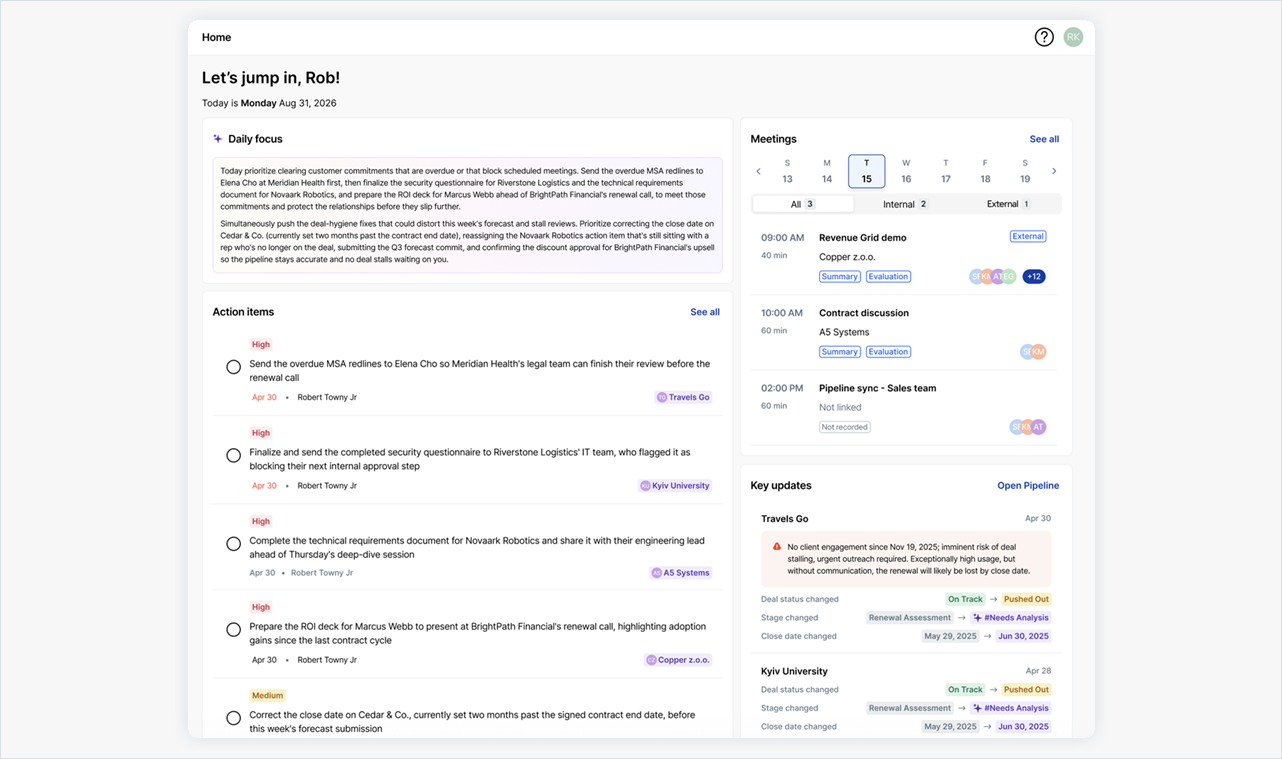
The Home page gives you a personalized overview of your meetings, deal updates, and action items so you can quickly identify what needs your attention.
Use it to start your day with the most relevant priorities in one place instead of checking your calendar, CRM records, and action items separately.
Daily focus#
Daily focus provides an AI-generated briefing based on your open action items. It highlights your most important priorities and related tasks so you can quickly decide what to work on first.
Meetings#
The Meetings widget gives you quick access to your schedule and relevant meeting information so you can prepare for upcoming conversations and review completed ones.
You can filter the list by internal or external meetings and access available meeting artifacts: Prep for upcoming meetings and Summary and Evaluation for completed meetings.
Select See all to open the Meetings IQ page.
For more information about meeting insights and artifacts, see Meetings IQ.
Action items#
Action items shows your five highest-priority open action items. Use the widget to review your immediate priorities and mark items as completed directly from the Home page.
Select See all to open the Action items page and review all your action items.
For more information, see Action items.
Key updates#
Key updates highlights recent changes and AI-generated insights for opportunities you own, helping you identify deals that may need your attention.
Depending on the changes detected for an opportunity, you may see:
An action priority that requires attention
A deal status change
A stage prediction change
A close date prediction change
The widget shows changes from the past two weeks, with the newest updates first.
For more information about deal predictions, see Revenue IQ.
Why some widgets might not appear#
The widgets available on your Home page depend on the Revenue Grid features enabled for your organization:
The Meetings widget is available when Meetings IQ is enabled.
Key updates is available when either Revenue IQ or Relationship IQ is enabled.
Daily focus and Action items don’t depend on these specific components.
If Revenue Grid AI features aren’t enabled for your organization, the Home page isn’t available in the navigation menu.