

Change the Salesforce integration user for Revenue Grid Salesforce Scheduler Adapter#
To use the Revenue Grid Salesforce Scheduler Adapter, your Salesforce organization must be connected to Revenue Grid using a dedicated integration user. This user authorizes the connection and ensures secure communication between the platforms.
You can change the integration user at any time, such as when the current user account is no longer in use or no longer meets the integration requirements.
Integration user requirements#
Before changing the integration user, ensure the new user account meets the following requirements:
The user has the System Administrator profile in Salesforce.
The user is provisioned to the correct Revenue Grid tenant.
The user has the Platform admin role in Revenue Grid.
Use a dedicated integration user account
Avoid using personal accounts to prevent issues caused by password resets, permission changes, or deactivation.
Change the integration user for Salesforce Scheduler Adapter#
To update the integration user for the Revenue Grid–Salesforce connection:
Sign in to Salesforce and open the Setup page.
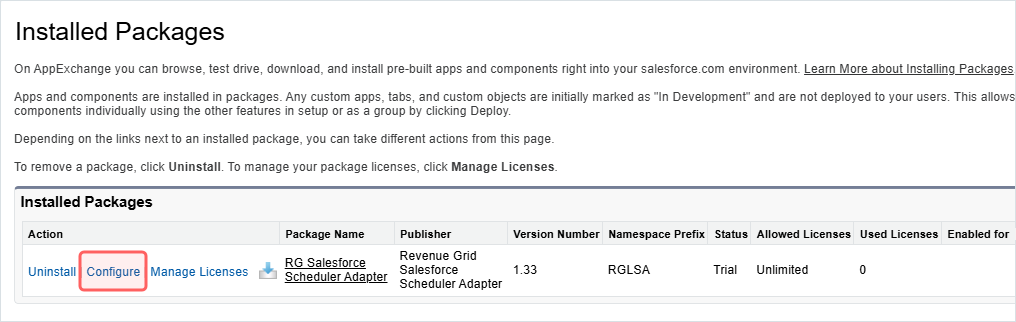
In the Quick Find field, search for Installed Packages, and open the page.
Click Configure next to the RG Salesforce Scheduler Adapter package.
Click Disconnect.
In the Integration User box, select the user you want to assign as the new integration user.
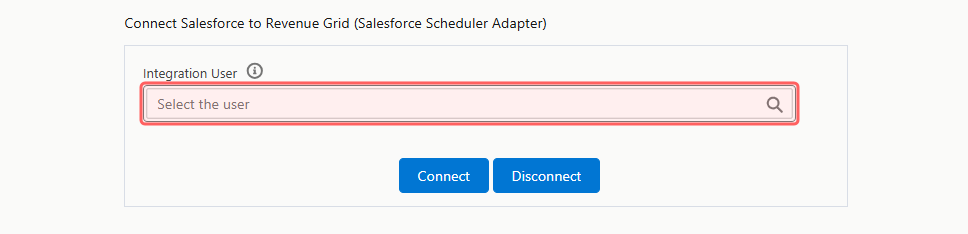
Select Connect.